Web HostingMost affordable shared hosting from TZS 9,100 per year
 Dedicated ServersExperience unmatched power and control with a physical server in Tanzania.
 WordPress HostingHigh-Speed, Tanzania-Optimized WordPress Hosting
 Windows HostingOptimized for Windows-based applications and websites
 cPanel HostingUser-friendly hosting powered by cPanel
 Email HostingProfessional Tanzanian email hosting for your .co.tz domain (Secure, reliable, and Swahili-supported)
 Reseller HostingLaunch your own hosting business with minimal technical requirements
 Affiliate ProgramEarn referral commissions by promoting our services
 DomainsFind and register available domain names in seconds
 Domain TransferMove your domain to us with zero downtime and full control
 .co.tzSecure the trusted .co.tz domain made for Tanzanian businesses.
 .tz DomainClaim the official .tz domain for national trust and recognition.
 .com DomainSecure the trusted .com domain for Tanzanian businesses.
 Supported Tlds (glTLDs and ccTLDs)Browse and register domain extensions from around the world
 Whois Lookup | Find Out Who Owns a DomainLook up domain ownership, expiry dates, and registrar information
 VPS
VPS VPS Hosting TanzaniaDedicated resources. Tanzanian performance. Full server control.
 Managed VPS TanzaniaNot a tech expert? Choose a managed Tanzania VPS.
 Website BuilderEasily build beautiful websites with drag-and-drop simplicity.
 Online ShopLaunch a professional e-commerce store without writing code.
 BlogFind latest business, marketing, and tutorials
 Contact UsContact Truehost TZ | 24/7 Web Hosting Support
Have you ever tried managing a website and felt completely lost? You log in to your hosting account, and there it is a web of files, folders, databases, and settings. You just want your site to work, but instead, you’re stuck wondering, “Where do I even click?”
That’s where a web hosting control panel comes in, especially for Windows hosting. In other words, the Web hosting control panel is your all-in-one command center that turns confusing technical work into simple clicks. Instead of typing code or asking your “tech guy” for help every time you want to change something, a control panel lets you stay in control.
But the big question is which control panel is truly the best for Windows hosting in Tanzania?
Let’s go step by step! I’ll explain what these panels do, compare the top ones, and show you which one Truehost recommends and why.
What is Web Hosting Control Panels

If you’re new to hosting, think of your control panel like your car dashboard. You don’t need to understand how the engine works. You just need clear controls for fuel, speed, and direction.
In the same way, a web hosting control panel helps you manage:
- Your domain names (like yourbusiness.co.tz)
- Emails (like [email protected])
- Website files and folders
- Databases (where your content and data live)
- Backups, SSL certificates, and security settings
Without a control panel, you’d have to do all this manually using long, complex commands and let’s be honest, nobody has time for that.
But remember there are many types of control panels. Some are modern and easy, while others feel like using Windows XP in 2025.
Picking the wrong one can make managing your site frustrating. But the right one? It saves you time, improves your website’s performance, and helps you scale your online business smoothly.
Here’s why your choice matters:
- Ease of Use: The simpler the panel, the less time you spend figuring things out.
- Reliability: A well-maintained panel means fewer bugs, better uptime, and stronger security.
- Compatibility: Windows hosting needs a panel built for Microsoft technologies.
- Support: A popular panel means easier access to guides, tutorials, and customer help.
Always remember, the control panel you pick will decide how smoothly your hosting experience goes.
The Top Control Panels for Windows Hosting in Tanzania
Now let’s get practical. Here are the most reliable, feature-rich, and widely used control panels for Windows hosting. Each is reviewed honestly, with its strengths, weaknesses, and ideal users.
1) Plesk – The King of Windows Hosting Control Panels
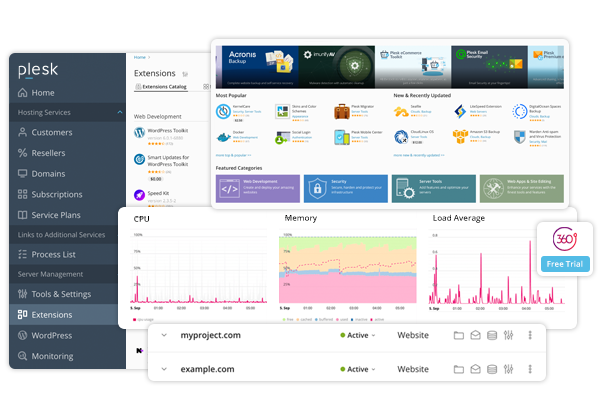
If Windows hosting had a royal family, Plesk would wear the crown. It’s the most popular control panel for Windows servers, used by millions of web admins globally.
You’ll find it offered by top hosting web hosting providers in Tanzania. For instance, Truehost not only recommends the Plesk control panel but also uses it for all Windows hosting clients.
What Makes Plesk Stand Out
Plesk is known for its clean interface and strong support for Microsoft technologies. It integrates perfectly with ASP.NET, MSSQL, and Microsoft Exchange.
When you log in, everything you need is user friendly like a dashboard on your smartphone. You can manage emails, websites, backups, and security all from one place.
Pros of Plesk
- User-friendly interface, perfect for beginners and pros
- Excellent support for ASP.NET and Microsoft SQL databases
- Built-in security tools (firewall, antivirus, SSL management)
- One-click app installation (WordPress, Joomla, etc.)
- Works well for both Windows and Linux servers
Cons of Plesk
- Slightly higher cost compared to other panels
- Can be resource-heavy on small servers
- Some advanced tools may confuse complete beginners
Verdict:
If you’re hosting an ASP.NET website in Tanzania, Plesk is your safest and smartest choice. It’s what Truehost recommends for all Windows hosting users because it simply works.
2) WebsitePanel – The Open-Source Alternative

If you’re the kind of person who loves flexibility and open-source tools, then you’ll want to look at SolidCP, formerly known as WebsitePanel.
It’s free and community-driven, making it popular among developers who want full control without paying for licenses.
Why SolidCP Appeals to Developers
SolidCP gives you advanced control over multi-server environments. That means you can manage different websites and hosting accounts from one dashboard.
It also supports:
- IIS (Internet Information Services) management
- FTP accounts
- Email systems (SmarterMail, MailEnable)
- Databases (MySQL, MSSQL)
Pros of SolidCP
- 100% free and open-source
- Supports multi-server setups
- Strong Windows Server integration
- Active developer community
Cons of SolidCP
- Not ideal for beginners – requires technical know-how
- Interface isn’t as modern or smooth as Plesk
- Fewer automatic updates and official support options
Verdict:
If you’re a Tanzanian web developer managing several client sites or running a local hosting company, SolidCP gives you freedom. But for beginners or business owners, it might feel too technical.
3) DirectAdmin for Windows – Lightweight but Capable

While DirectAdmin is mostly known for Linux hosting, it also works on Windows environments with some tweaks.
It’s a fast, lightweight control panel designed for simplicity. That makes it ideal for you if you have small to medium websites that need basic features without the heavy interface.
Why You Might Like DirectAdmin
DirectAdmin focuses on speed. If your hosting plan doesn’t have massive resources, this panel won’t slow you down.
You get the basics such as:
- File manager
- Email setup
- Database tools
- Domain and DNS management
Pros of DirectAdmin
- Lightweight and fast which is ideal for smaller servers
- Simple, clean interface
- Affordable license cost
- Easy for non-technical users
Cons of DirectAdmin
- Limited advanced features
- Setup on Windows is not as straightforward
- Lacks the depth and polish of Plesk
Verdict:
If your Windows hosting needs are light such as a personal blog or a small business site in Mwanza, then DirectAdmin can get the job done without complexity. But if you need enterprise-level tools, go with Plesk.
4) MSPControl – Built for Windows, By Windows Users

MSPControl is another panel designed specifically for Windows environments. It’s actually a successor to WebsitePanel but improved with better security and performance.
It’s ideal for you if you are a smaller hosting provider or an IT company who wants to offer Windows hosting services without paying for Plesk.
Why MSPControl is Worth a Look
MSPControl integrates neatly with Windows features like Active Directory, IIS, and Exchange. It’s also designed for resellers, so if you plan to sell hosting services yourself, this could be a smart option.
Pros of MSPControl
- Free and Windows-specific
- Great for resellers and IT admins
- Integrates deeply with Windows Server
- Multi-server management support
Cons of MSPControl
- Not very beginner-friendly
- Setup can be technical
- Interface feels dated compared to Plesk
Verdict:
If you’re a tech-savvy Tanzanian hosting reseller or IT firm, MSPControl is a practical and affordable option. It gives you the features of Plesk minus the price tag, especially if you don’t mind the complex setup and management process.
Comparison Table – Best Windows Hosting Control Panels
Not sure which one fits you best? This table sums up the strengths and weaknesses of each Windows hosting control panel at a glance.
| Control panel | Ideal for | Ease of Use | Main Advantage | Main Limitation |
| Plesk | Businesses and beginners | Very Easy | User friendly/Full microsoft support | Cost |
| SolidCP | Developers | Medium | Open source and powerful | Technical setup |
| DirectAdmin | Small sites | Easy | Fast and lightweight | Limited features |
| MSPcontrol | IT admins/Resellers | Medium | Multi server support | Complex setup |
Which is the Best Web Control Panel for Windows Hosting: Truehost Choice
Plesk is the best web control panel for Windows hosting. At Truehost, it is the default and recommended control panel for all Windows hosting plans.
Why? Because it offers a perfect balance between simplicity and power. This means even when you’re a beginner you can manage your websites easily. Also when you are an advanced user, you enjoy all the tools you need.
Truehost also gives you 24/7 local support in both English and Swahili, so you can get help immediately whenever you face a hosting issue. The pre-installed Plesk control panel makes managing your website simple and fast, even if you’re not a tech expert.
So whether you’re hosting your school management system, church website, or e-commerce store, you can focus on growing, not fixing hosting problems.
Frequently Asked Questions (FAQs)
1) What is a Windows hosting control panel?
A Windows hosting control panel is a web-based interface that allows you to manage your website and hosting services. It simplifies tasks like uploading files, creating email accounts, and installing applications, making it easier even for beginners to handle their hosting needs.
2) Which control panel is most reliable for Windows hosting?
Plesk is the most reliable control panel for Windows hosting. This is due to its user-friendly interface and comprehensive features. It supports various Microsoft technologies and provides tools for managing websites, emails, databases, and security settings, all within a single dashboard.
3) Are free Windows hosting control panels secure?
Free Windows hosting control panels can be secure, but it depends on how they are configured and maintained. You should use strong passwords, enable firewalls, and apply regular security updates. Many free panels also include built-in security tools, but paid solutions often offer more reliable support and advanced protection.
4) Are there good self-hosted control panels for Windows hosting?
Yes. SolidCP is free and simple to use but lacks active updates and support. MSPControl offers many tools but can be hard to install and maintain. If you want stability, security, and full support, Plesk remains the most reliable choice for Windows hosting.
Final Thoughts: Picking the Right Dashboard for Your Windows Hosting
So, which is the best web hosting control panel for Windows hosting in Tanzania? If you want a smooth, professional, and secure experience, Plesk is the best all-round choice.
If you’re a developer looking for flexibility, SolidCP or MSPControl are great free alternatives.
But remember, your control panel is like the dashboard of your car. It won’t drive the car for you, but it makes the journey a lot easier.
At the end of the day, the goal isn’t just to host a website. It’s to manage it efficiently, grow it, and serve your audience faster and better.
The best thing, Truehost offers Windows hosting with preinstalled Plesk, so no hassles of setups. So, get Truehost Windows hosting and skip the headaches of configuring control panels now!