Web HostingMost affordable shared hosting from TZS 9,100 per year
 Dedicated ServersExperience unmatched power and control with a physical server in Tanzania.
 WordPress HostingHigh-Speed, Tanzania-Optimized WordPress Hosting
 Windows HostingOptimized for Windows-based applications and websites
 cPanel HostingUser-friendly hosting powered by cPanel
 Email HostingProfessional Tanzanian email hosting for your .co.tz domain (Secure, reliable, and Swahili-supported)
 Reseller HostingLaunch your own hosting business with minimal technical requirements
 Affiliate ProgramEarn referral commissions by promoting our services
 DomainsFind and register available domain names in seconds
 Domain TransferMove your domain to us with zero downtime and full control
 .co.tzSecure the trusted .co.tz domain made for Tanzanian businesses.
 .tz DomainClaim the official .tz domain for national trust and recognition.
 .com DomainSecure the trusted .com domain for Tanzanian businesses.
 Supported Tlds (glTLDs and ccTLDs)Browse and register domain extensions from around the world
 Whois Lookup | Find Out Who Owns a DomainLook up domain ownership, expiry dates, and registrar information
 VPS
VPS VPS Hosting TanzaniaDedicated resources. Tanzanian performance. Full server control.
 Managed VPS TanzaniaNot a tech expert? Choose a managed Tanzania VPS.
 Website BuilderEasily build beautiful websites with drag-and-drop simplicity.
 Online ShopLaunch a professional e-commerce store without writing code.
 BlogFind latest business, marketing, and tutorials
 Contact UsContact Truehost TZ | 24/7 Web Hosting Support
You open your online store, excited for visitors. Then, a customer clicks on a product, but instead of seeing your page, their browser flashes “Your connection is not private.” They panic, click away, and you lose a sale before it even starts.
These warnings are more than a minor inconvenience because they shake trust instantly. Visitors hesitate to enter personal information, pay for products, or even stay on your site. And if search engines notice, your ranking can drop too.
SSL certificate errors can strike any website, from a local business site in Tanzania to an e-commerce store serving clients worldwide. The result is always the same! Lost trust, frustrated users, and potential revenue slipping away.
That’s why you need to read this guide! I’ll explain exactly what SSL certificate errors are, the most common types, how to fix them step by step, and how using a reliable host like Truehost can prevent these errors from ever happening.
What Is an SSL Error
An SSL certificate error occurs when a browser cannot verify the security of your website’s HTTPS connection. In simple terms, the padlock icon in the address bar is broken, and visitors are warned that the site may not be secure.
These errors happen for several reasons. Sometimes, the SSL certificate has expired, meaning the browser can no longer confirm it as valid. Other times, the domain listed in the certificate does not match your website address, which is common if you installed a certificate for www.yoursite.co.tz, but visitors access the non-www version.
The errors can also appear if your server sends the wrong certificate chain, leaving browsers unable to verify authenticity. Or if the server uses outdated protocols or weak encryption ciphers, which modern browsers reject, it can lead to SSL errors showing.
The impact of SSL errors is significant. Visitors may leave your site immediately, hesitant to provide personal information or make purchases. Search engines also consider HTTPS a ranking factor, so persistent SSL issues can harm your SEO performance. In addition, these errors create potential security risks, as data transmitted between the visitor and your server may not be properly encrypted.
According to reports by SE Ranking and UptimeRobot, many SSL/TLS errors globally involve expired or untrusted certificates, misconfigurations, or outdated protocols. In Tanzania, where online trust is still developing, a prominent red warning can cause even cautious visitors to abandon your website instantly. So, knowing and addressing these errors promptly not only secures your site but also reassures your audience that your business is reliable and professional.
Common SSL Certificate Errors and How to Fix Them
SSL certificate errors can appear for different reasons. Sometimes the problem is with the certificate itself, other times it’s due to server configuration or outdated settings.
Either way, below are common SSL errors that you may encounter and how to fix them:
1) Expired or Not Yet Valid Certificate
One of the most frequent SSL errors occurs when your certificate has either expired or hasn’t yet started. When a visitor loads your site, the browser immediately flags the connection as untrusted. This can happen if you forget to renew the certificate or if a certificate is installed with a future start date.
To fix this, first check the certificate’s validity period. Then, renew the certificate before it expires or install a new one if it hasn’t started yet. It’s also crucial to verify that your server’s clock and timezone are correct, as an incorrect server time can make even a valid certificate appear invalid.
The good thing is reliable hosting providers like Truehost offer automatic SSL renewal, whereby you can set up, thus preventing future lapses.
2) Domain Name Mismatch
Another common error arises when the domain listed in the certificate doesn’t match the URL your visitor uses. For example, a certificate may be issued for www.yoursite.co.tz, but a visitor types yoursite.co.tz. The browser sees a mismatch and warns the user.
The solution is to ensure all necessary domains are included in your certificate. This includes both the www and non-www versions, and any subdomains if needed.
That said, Wildcard certificates are particularly useful if your site uses multiple subdomains. Additionally, redirecting all alternate domain forms to your primary domain ensures consistency and prevents these warnings.
3) Untrusted Certificate Authority (CA) or Incomplete Chain
Browsers rely on a trusted chain of certificate authorities to validate SSL certificates. That means if your certificate is self-signed, issued by an unrecognized CA, or if intermediate certificates are missing, users will see a security warning.
To avoid this, always use a certificate from a well-known CA trusted by major browsers. Ensure you upload the full certificate chain, including root, intermediate, and server certificates. For further verification of the error, online tools like SSL Labs’ SSL Test can help identify chain issues and verify proper installation.
4) Mixed Content or HTTP Resources on HTTPS Page
Even after installing a valid SSL certificate, your site can trigger warnings if some resources load over HTTP instead of HTTPS. This is known as mixed content. It occurs when Images, scripts, or stylesheets referenced with HTTP links cause browsers to mark the site as partially insecure.
Fixing this involves updating all resource links to HTTPS. That includes using relative links or protocol-agnostic links (//yourdomain.com/path) to ensure resources automatically load securely.
5) Outdated Protocols or Ciphers (TLS/SSL Version Mismatch)
Older SSL or TLS protocols like SSL 3.0 or weak cipher suites are no longer considered safe. Therefore, modern browsers may refuse connections to servers that rely on outdated settings, resulting in errors.
To fix this, configure your server to use modern TLS versions such as TLS 1.2 or TLS 1.3. Plus, disable legacy protocols and ensure your cipher suite settings include only strong, secure algorithms.
6) Incorrect Server Configuration (Handshake Errors, Certificate Mismatch)
Sometimes, the server itself is misconfigured. This can lead to handshake errors or cryptic messages like ERR_SSL_VERSION_OR_CIPHER_MISMATCH. The causes of this error include binding the wrong certificate to the domain, missing Server Name Indication (SNI) on shared hosting, or virtual host misconfigurations.
So, to be safe, check that the correct SSL certificate is installed for your domain. Also, if you use shared hosting, make sure SNI is enabled so multiple certificates can coexist on the same IP.
7) Revoked Certificate or Certificate Misuse
Occasionally, a certificate may be revoked by the CA due to security breaches, key compromise, or improper usage. Thus, browsers will refuse to establish a secure connection if the certificate appears on a revocation list.
To resolve this, check the certificate’s revocation status using CRL (Certificate Revocation List) or OCSP (Online Certificate Status Protocol). If revoked, obtain a new certificate from a trusted CA. Also, investigate the cause of revocation and address the underlying issue to prevent future problems.
How Truehost Eliminates SSL Certificate Errors
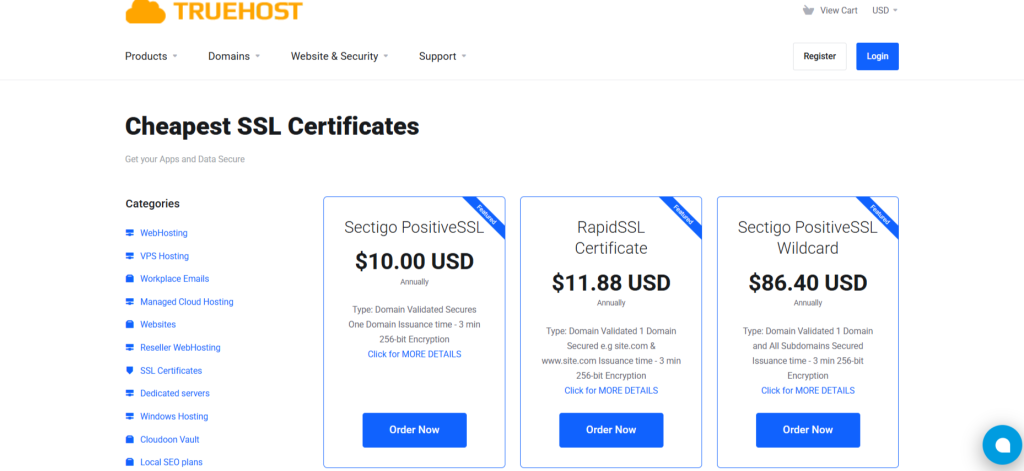
Hosting with Truehost in Tanzania makes managing SSL certificates much easier. Many common errors are minimized or even handled automatically, so your website stays secure without constant technical hassle.
For example, Truehost provides a simple, user-friendly dashboard for installing SSL certificates. Whether you pick a free certificate or a premium option, the setup is mostly automated. This reduces the risk of misconfigurations that often trigger errors.
Renewal is another area where Truehost helps. You receive timely reminders and notifications, preventing expired certificates, which is a leading cause of SSL warnings.
In addition, for websites with multiple domains or subdomains, Truehost supports wildcard and multi-domain SSL certificates. This ensures proper coverage and prevents domain mismatch issues, whether you’re targeting visitors in Dar es Salaam, Moshi, or across Tanzania.
Truehost also maintains modern server configurations. We support up-to-date TLS versions and ensure the correct certificate chain, reducing the likelihood of protocol errors, incomplete chain warnings, or cryptic handshake messages.
So, by choosing Truehost, you get a reliable hosting partner who handles much of the behind-the-scenes SSL work. That means you can focus on growing your website and business instead of troubleshooting endless SSL errors.
Frequently Asked Questions (FAQs)
1) What is an SSL error and how to fix it?
An SSL error occurs when a website’s secure connection (HTTPS) cannot be validated by a browser. Common causes include expired certificates, domain mismatches, or incorrect server configuration.
To fix an SSL error, check your certificate’s validity, ensure the correct domain is included, update server settings, and use a trusted Certificate Authority (CA). Tools like SSL Labs can help identify and resolve these issues.
2) How do I fix a common SSL protocol error?
A common SSL protocol error happens when your server and browser cannot agree on the TLS/SSL version or cipher. To fix it, update your server to support modern protocols like TLS 1.2 or TLS 1.3, disable outdated protocols (SSL 3.0, TLS 1.0), and ensure strong cipher suites are enabled. Plus, verifying your server with online SSL checkers ensures the protocol is properly configured.
3) How to fix error 107 (net::ERR_SSL_PROTOCOL_ERROR): SSL protocol error?
Error 107 (net::ERR_SSL_PROTOCOL_ERROR) indicates a mismatch between the browser and server SSL/TLS settings. To fix it, ensure your server uses up-to-date TLS versions, install a valid SSL certificate from a trusted CA, clear browser cache, and check that no firewall or proxy is blocking secure connections. Correcting these steps resolves most SSL protocol errors.
4) What is a common name SSL error?
A common name SSL error occurs when the domain in the SSL certificate does not match the website’s URL. For example, the certificate may be issued for www.example.co.tz, but visitors access example.co.tz.
To fix the error, use a certificate that covers all necessary domains, including www and non-www versions, or set up proper redirects to the main domain.
Final Thoughts
SSL certificate errors all come down to trust. Visitors leave when they see warnings, leading to lost sales and even Google deranking. So, being aware of these issues before they occur helps you secure preventive measures to keep your website safe, professional, and reliable.
For instance, focus on the essentials such as keeping your SSL certificate valid, ensuring the domain matches exactly, serving all content over HTTPS, and using modern server settings. These steps prevent the most common SSL issues.
But also, choosing a reliable host like Truehost takes the stress out of SSL management. From easy installation and auto-renewals to support for multi-domain and wildcard certificates, Truehost helps your site stay secure so you can focus on growth.