Web HostingMost affordable shared hosting from TZS 9,100 per year
 Dedicated ServersExperience unmatched power and control with a physical server in Tanzania.
 WordPress HostingHigh-Speed, Tanzania-Optimized WordPress Hosting
 Windows HostingOptimized for Windows-based applications and websites
 cPanel HostingUser-friendly hosting powered by cPanel
 Email HostingProfessional Tanzanian email hosting for your .co.tz domain (Secure, reliable, and Swahili-supported)
 Reseller HostingLaunch your own hosting business with minimal technical requirements
 Affiliate ProgramEarn referral commissions by promoting our services
 DomainsFind and register available domain names in seconds
 Domain TransferMove your domain to us with zero downtime and full control
 .co.tzSecure the trusted .co.tz domain made for Tanzanian businesses.
 .tz DomainClaim the official .tz domain for national trust and recognition.
 .com DomainSecure the trusted .com domain for Tanzanian businesses.
 Supported Tlds (glTLDs and ccTLDs)Browse and register domain extensions from around the world
 Whois Lookup | Find Out Who Owns a DomainLook up domain ownership, expiry dates, and registrar information
 VPS
VPS VPS Hosting TanzaniaDedicated resources. Tanzanian performance. Full server control.
 Managed VPS TanzaniaNot a tech expert? Choose a managed Tanzania VPS.
 Website BuilderEasily build beautiful websites with drag-and-drop simplicity.
 Online ShopLaunch a professional e-commerce store without writing code.
 BlogFind latest business, marketing, and tutorials
 Contact UsContact Truehost TZ | 24/7 Web Hosting Support
A website that loads slowly or goes offline isn’t just annoying but also a problem that drives visitors away and hurts your credibility. Most people think design or content is to blame, but in truth, it often comes down to one thing! That’s web hosting.
Web hosting is the quiet power behind every site you visit. It decides how fast your pages load, how secure your data stays, and how often your site is actually online. Yet many website owners in Tanzania and beyond still treat it as an afterthought.
If you plan to launch a business site, sell products online, or share ideas with the world, choosing the right hosting can make or break your project.
This guide walks you through what web hosting really is, how it works, the different types available in Tanzania, and how to pick the one that keeps your website reliable.
So, before you click “publish,” let’s uncover the foundation that holds every great website together, your web hosting.
What is Web Hosting?

Web hosting is a service that allows your website to be visible on the internet.
When you create a website, you generate files such as text, images, and code. These files need to be stored on a special computer that stays connected to the internet all the time.
That computer is called a server, and the company that owns and maintains it is known as a web host. Whenever someone types your website name into their browser, the web host delivers those stored files to their screen, allowing your site to appear instantly.
In simple terms, web hosting is what gives your website a home online which is a reliable space where your content lives and can be accessed by anyone, anywhere, at any time.
How Web Hosting Works
Web hosting works by storing your website’s files on a special computer called a server that is always connected to the internet. When you have a website, you design pages, write content, and upload images, all of which need a place to live online. The web host provides that space on its server so people can access your site anytime.
Once you choose a hosting plan, your provider gives you space on their server. You then upload your website files, either manually or through a system like WordPress, so they’re stored and ready to be viewed online. Next, you connect your domain name to your hosting account. This step tells the internet where your site’s files are located, so that when someone types your web address, their browser knows exactly where to go.
When visitors open your website, their browser sends a request to your host’s server. The server responds by sending back all the necessary files such as text, images, and layout which the browser assembles into the web page you see. This exchange happens in seconds, allowing your website to appear almost instantly.
Behind the scenes, your hosting provider keeps the server powered, secure, and online 24/7. They handle things like data backups, software updates, and protection against cyber threats. Nevertheless, a good web host like Truehost ensures your site loads quickly, stays online even during traffic spikes, and remains safe from security risks.
What Are the Different Types of Web Hosting
Not all websites need the same kind of home. Some are like small kiosks that need just a few shelves, while others are more like supermarkets that serve thousands of visitors daily.
That’s why web hosting comes in different types, each designed for specific needs, budgets, and technical skills.
For example, here are the main types of web hosting you’ll come across:
- Shared Hosting
- VPS (Virtual Private Server) Hosting
- Dedicated Server Hosting
- Reseller Hosting
- Cloud Hosting
- Free Hosting
- cPanel Hosting
- Windows Hosting
Now, keep reading to discover what each of these website hosting types means, who it’s for, why you might choose it, and what to expect before signing up.
1) Shared Hosting

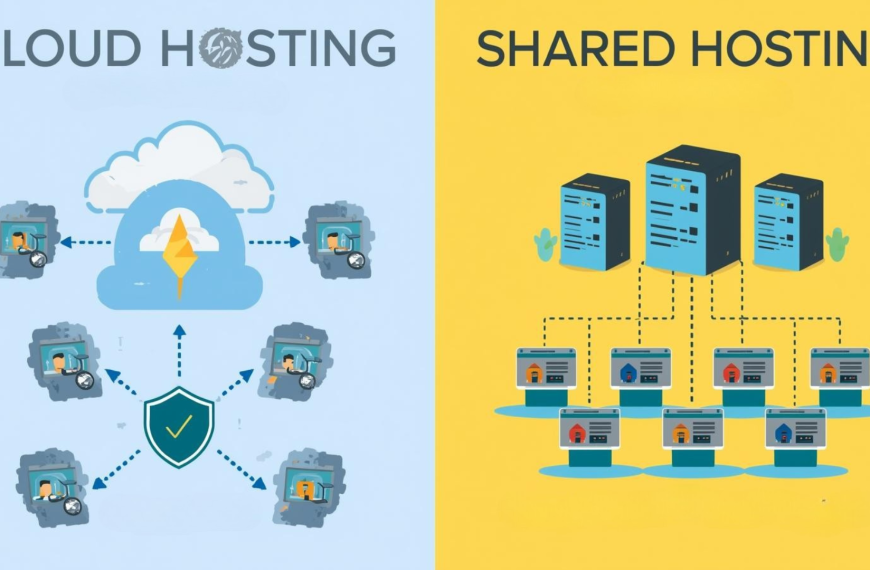
Shared hosting is the simplest and most popular way to get a website online. Think of it as renting a room in a large apartment building where several tenants share the same water, electricity, and internet connection. In this case, your website shares server resources, like CPU, memory, and storage with many others.
Because of that shared setup, it’s incredibly affordable. You can launch your website quickly without worrying about managing servers or configuring complicated systems. That’s because most hosting providers handle all the technical work for you, from security updates to backups.
Lastly, shared hosting is an excellent choice if you’re a beginner, blogger, or a small business owner who just needs a stable place for their site to live.
However, since resources are divided among multiple users, performance can sometimes dip, especially when one site on the same server gets sudden traffic spikes. It’s a bit like living next to a noisy neighbor who occasionally overloads the power grid.
Pros
- Extremely affordable
- Hassle-free setup with no technical experience needed
- Maintenance, security, and server management handled by the provider
- Perfect for personal blogs, portfolios, and small business sites
Cons
- Performance can slow down if other sites use too many resources
- Limited control and customization options
2) VPS (Virtual Private Server) Hosting

VPS hosting is a step up from shared hosting. Instead of sharing all the server’s power with everyone, you get your own dedicated portion of it. It’s like living in an apartment within a modern complex where you share the same building, but your unit has its own walls, utilities, and privacy.
So, with VPS hosting, your website runs in its own virtual environment with dedicated resources like RAM, CPU, and storage. This setup means better speed, stability, and security since your performance isn’t affected by what happens on other sites.
The VPS website hosting is a smart choice for growing businesses, eCommerce stores, and developers who need more flexibility or custom software installations. Though it’s slightly more expensive than shared hosting, the improved control and reliability often justify the cost, especially when your website starts attracting more visitors.
Pros
- Dedicated resources that boost performance and uptime
- Greater flexibility and control over server settings
- Can handle higher traffic and more demanding applications
Cons
- Costs more than shared hosting plans
- May require some technical knowledge for setup and maintenance
3) Dedicated Server Hosting
Dedicated server hosting is the powerhouse of web hosting. Here, you get the entire server all to yourself with no sharing or competition for resources. It’s like owning your own building rather than renting an apartment. Everything inside is yours to design, manage, and secure.
With full control over the hardware and software, you can fine-tune performance, install custom applications, and set up advanced security measures. This makes dedicated hosting ideal for large eCommerce stores, government systems, enterprise websites, or web apps that handle thousands of users daily.
Most importantly, dedicated server hosting performance is unmatched with fast loading speeds, top-notch reliability, and complete data privacy.
However, freedom comes with added responsibility. You or your team will need to manage updates, backups, and general maintenance unless you choose a managed plan where your hosting provider handles it for you.
Pros
- Exceptional speed, performance, and reliability
- Full control over every setting, including security and software
- Best suited for high-traffic, data-intensive, or mission-critical websites
- Offers maximum privacy and stability
Cons
- Higher cost compared to other hosting types
- Requires technical skills or dedicated IT support
4) Reseller Hosting

Reseller hosting is a clever way to run your own small hosting business without owning or managing any servers. You purchase a bulk hosting plan from a provider and divide it into smaller packages for your clients, each with their own account, control panel, and resources.
This setup is perfect for web designers, developers, and digital agencies that manage multiple client websites. It allows you to include hosting as part of your services, making your business more valuable and convenient for clients. You can even customize the branding, so your customers see your company name instead of the main provider’s.
However, while reseller hosting gives you business flexibility, you still depend on your hosting provider for uptime, security, and server performance. Your job mainly focuses on managing your clients and providing them with support.
Pros
- Lets you start your own hosting business with minimal investment
- Easy to manage multiple client accounts under one dashboard
- Allows you to brand and sell hosting under your own company name
- Cost-effective for agencies, web developers, and freelancers
Cons
- Still depends on the parent provider’s infrastructure and uptime
- Requires handling customer support for your clients
5) Cloud Hosting
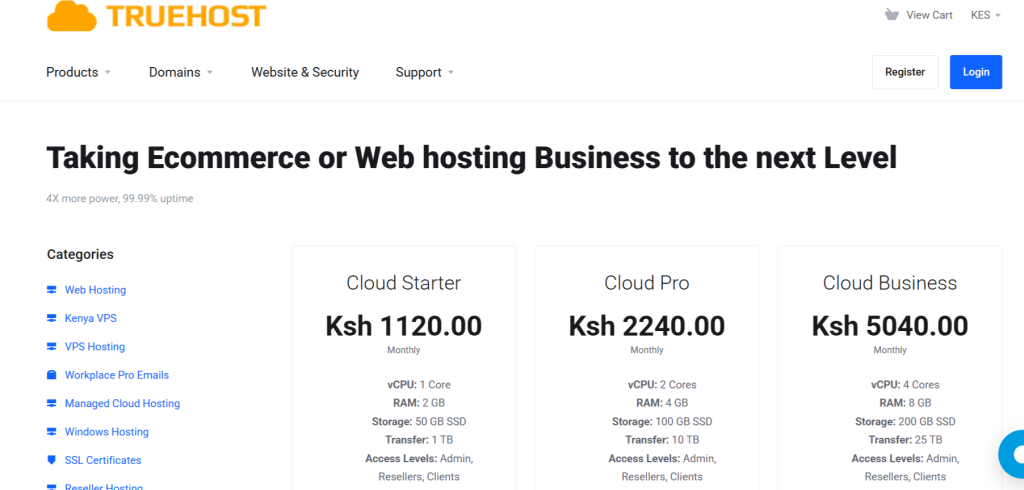
Cloud hosting is one of the most flexible and reliable hosting options available today. Instead of storing your website on a single physical server, it uses a network of interconnected servers, known as “the cloud.” These servers work together to keep your site online, share the workload, and balance traffic automatically.
If one server goes down, another instantly takes over, meaning your website stays live and responsive. This setup also allows you to scale resources like storage and bandwidth in real time, increasing capacity during busy seasons and reducing it when traffic is low.
Cloud hosting is perfect for growing businesses, eCommerce sites, and projects that experience unpredictable traffic spikes.
Many providers, including Truehost Cloud, offer flexible pay-as-you-go pricing, so you only pay for what you actually use. It’s modern, cost-efficient, and built for growth.
Pros
- Exceptionally reliable with minimal downtime
- Scales resources instantly as your website grows
- Fast performance due to load balancing across servers
- Pay-as-you-go pricing ensures cost efficiency
Cons
- Can be slightly complex for beginners to manage
- Costs can fluctuate depending on resource usage
6) Free Hosting
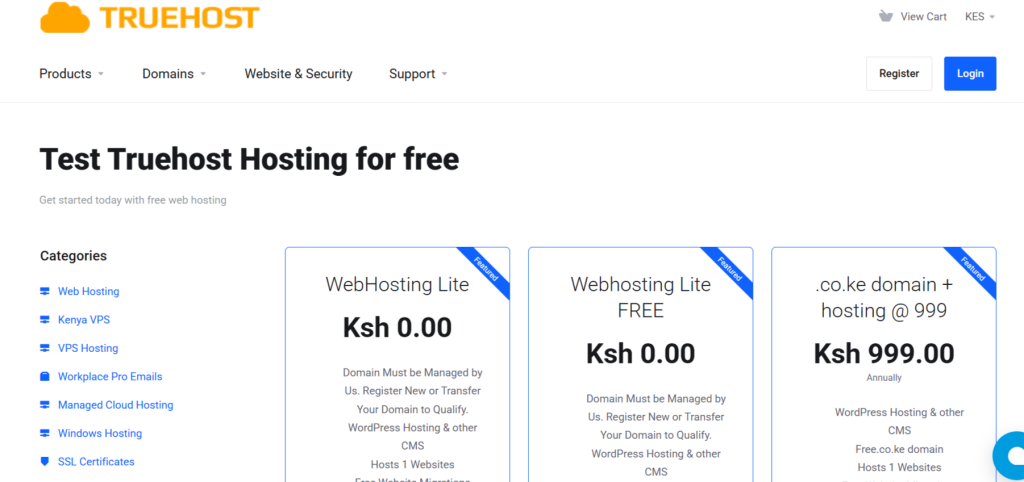
Free hosting is exactly what it sounds like! Hosting that doesn’t cost a cent. It’s a great starting point if you’re just learning how websites work or want to test a small project before going live. Think of it as borrowing a small corner in someone else’s digital store just to see how things fit.
However, free hosting comes with serious disadvantages. Most providers limit your storage space, bandwidth, and website speed. Some may even place ads or their branding on your site, which can make it look less professional. Even worse, security, uptime, and support are not guaranteed, meaning your site can go offline without notice.
So, while it’s fine for experiments, portfolios, or school projects, free hosting isn’t reliable enough for business or professional use. If you plan to grow or earn from your website, upgrading to a paid plan is a smarter move.
Pros
- Completely free to start with no upfront costs
- Great for testing, learning, or hobby projects
- Quick setup without technical steps
Cons
- Limited resources, speed, and reliability
- Often includes ads or forced branding
- Not suitable for professional or long-term use
7) cPanel Hosting

cPanel hosting isn’t a separate type of hosting but a simplified way to manage it. It comes with a visual dashboard called cPanel, which lets you control your website without needing technical skills. From one clean interface, you can manage files, create email accounts, add domains, install apps like WordPress, and monitor your site’s performance.
This setup makes cPanel hosting perfect for beginners and small businesses that want control without dealing with complex commands. It’s also widely used around the world, meaning you can easily find tutorials, guides, and community support whenever you need help.
Because of its convenience and reliability, many providers, including Truehost Cloud offer hosting plans with cPanel as the default management tool. It brings simplicity and power together in one place.
Pros
- Simple, user-friendly dashboard for easy website management
- Compatible with most hosting types and applications
- Great for managing multiple websites, emails, and databases
- Supported by a large community with plenty of learning resources
Cons
- Slightly higher cost due to licensing fees
- Limited customization for advanced or technical users
8) Windows Hosting
Windows hosting runs on Microsoft’s Windows Server, making it the go-to option for websites and applications built using Microsoft technologies such as ASP.NET, MSSQL, or Access databases.
It’s commonly chosen by businesses or developers who need seamless integration with other Microsoft tools and environments. For example, if your website connects to Microsoft Exchange, SharePoint, or .NET applications, Windows hosting is what you need.
While Windows hosting tends to be more expensive than Linux hosting, it delivers smooth performance and reliability for projects that depend on the Microsoft ecosystem.
Pros
- Fully supports Microsoft frameworks, tools, and databases
- Ideal for running ASP.NET and Windows-based web applications
- Seamless integration with Microsoft software and development environments
Cons
- Typically more expensive than Linux hosting
- Fewer hosting providers offer it compared to Linux-based options
Factors to Consider When Choosing the Best Web Hosting in Tanzania
Picking the right web hosting does not mean choosing one that offers low prices. Instead, you need to find a provider that keeps your website fast, secure, and reliable for your visitors.
That said, here are the key factors to check before you commit to any web hosting service provider in Tanzania:
1) Server Location
Where your website is hosted physically affects how fast it loads.
For Tanzanian businesses, choosing a host with servers in East Africa or nearby regions means quicker load times and better user experience. Otherwise, if your website relies on servers based far overseas, visitors may face slower performance.
2) Performance (Speed & Uptime)
Speed and uptime are what keep your site online and responsive. So, always look for hosts that guarantee at least 99.9% uptime.
Also, the host should use SSD storage, and include caching tools for faster delivery. This helps avoid frustrations due to poor speed and downtime.
3) Security & Backups
Security isn’t optional!
Your hosting provider should offer SSL certificates, malware protection, and automatic backups. These features protect your data and your visitors’ trust, especially if you’re collecting payments or running an e-commerce website.
4) Payment Options & Local Support
Go for a host that accepts local payment methods in Tanzania like M-Pesa, TigoPesa, Airtel Money, or bank transfers. Paying locally helps you avoid currency conversion fees.
Moreover, a local or Swahili-speaking support is also a plus as it means faster help when something goes wrong.
5) Scalability
Your website will grow and your hosting should grow with it. So, choose a provider that allows easy upgrades from shared hosting to VPS or cloud hosting without downtime or technical headaches.
6) Control Panel & Ease of Use
If you’re new to managing websites, look for hosting with cPanel or another user-friendly dashboard. This makes it simple to manage files, domains, and emails, so you can focus on your content instead of struggling with server settings.
7) Domain & Hosting Bundle
Many good web hosts like Truehost offer free domains for the first year, often including local options like .tz or .co.tz. This saves you money and ensures your brand identity stays local and professional.
8) Reputation & Reviews
Before committing, take time to read reviews from past users. Look at real performance data like uptime reports, support response times, and speed tests. This gives you a clear picture of what to expect beyond the marketing promises.
Frequently Asked Questions (FAQs)
1) Is web hosting necessary for a website?
Yes, web hosting is essential if you want your website to be visible online. Without hosting, your site files have nowhere to live. That’s because a hosting service stores your website data on a server and makes it accessible to anyone who types in your domain.
2) What is web hosting and how does it work?
Web hosting is a service that stores your website’s files on internet-connected servers. When someone visits your domain, the hosting server delivers those files to their browser, allowing your website to load. It works hand-in-hand with your domain name to keep your site live and accessible.
3) What is the difference between web hosting and a domain?
A domain name is your website’s online address, while web hosting is the physical space on a server that stores your site’s files. Typically, you need both the domain to tell users where to go, and hosting to deliver your website content when they arrive.
Final Thoughts
Choosing the right web hosting means your website will be online without downtimes or security issues!
In short, whether you’re building a blog, eCommerce store, or business site in Tanzania, your hosting choice determines how fast, secure, and reliable your site will be. Usually, the best web hosting doesn’t just keep your site online but keeps it performing at its best.
As you decide, think beyond price. Focus on speed, uptime, security, local support, and room to scale. This is because our website deserves a dependable home that grows with you and keeps visitors coming back.
If you’re ready to start strong, Truehost offers reliable and affordable web hosting in Tanzania, built for local businesses, developers, and dreamers who want to go further online.